Measuring your brand’s visibility in AI search is harder than traditional SEO, but it’s possible and if you’re not doing it yet, you’re flying blind in the fastest-growing part of search.
In this article, we cover five key areas you can measure right now. These are the same metrics we use at Core Optimisation to help our clients understand and improve their visibility in generative search.
Why is AI search harder to measure?
Traditional SEO focuses on metrics such as rankings, clicks, impressions and organic traffic.
AI search works differently. A customer may see your brand mentioned in ChatGPT, Gemini, Copilot or Perplexity without visiting your website. They may also click a citation, return later through Google or search directly for your brand.
This means clicks alone do not show the full value of AI visibility.
A practical AI measurement framework should include the following:
| Metric | What it tells you |
|---|---|
| AI referral traffic | How many visitors arrive from AI platforms |
| Mentions and citations | How often your brand or website appears in AI answers |
| Cited pages | Which pages AI tools are using as sources |
| Share of voice | How your visibility compares with competitors |
| Prompts | Which questions and topics are triggering your brand |
1. AI Referral Traffic
AI referral traffic is simply the traffic you receive when someone clicks a link in an AI tool and lands on your website. This could come from platforms such as ChatGPT, Gemini, Copilot, Claude or Perplexity.
Where can you see AI referral traffic?
The best place to start is Google Analytics 4 (GA4). You can create a custom channel group that brings known AI referral sources together in one report, making it much easier to see how much traffic these platforms are sending and what those visitors do on your site.
Step 1: Open your channel groups
In GA4, go to: Admin → Data display → Channel groups
Then select the option to copy the default channel group. This keeps your existing GA4 channels in place while allowing you to add a separate channel for AI traffic.
Step 2: Add a new AI channel
Within the copied channel group:
- Select Add new channel.
- Name the channel AI Traffic.
- Set the condition to:
○ Source
○ Matches regex
- Paste the following:
chatgpt\.com|chat\.openai\.com|gemini\.google\.com|deepseek\.com|perplexity(?:\.ai)?|claude\.ai|copilot\.microsoft\.com|deepl\.com|character\.ai|(?:\w+\.)?meta\.ai|grok\.x\.com|grok\.com|x\.ai|bard\.google\.com|(?:\w+\.)?mistral\.ai|writesonic\.com|quillbot\.com|chat\.suno\.com|turing\.microsoft\.com|cosmos\.microsoft\.com|orca\.microsoft\.com|phi\.microsoft\.com|megatron\.microsoft\.com|jarvis\.microsoft\.com|maia\.microsoft\.com|aitastic\.app|bnngpt\.com|chat-gpt\.org|(?:\w+\.)?edgepilot|firefly\.adobe\.com|edgeservices|iask\.ai|(?:\w+\.)?neeva|nimble\.ai|open-assistant\.io|(?:\w+\.)?copy\.ai|openchat\.so|blackbox\.ai|ex\.ai|cohere\.ai|anthropic\.com|(?:\w+\.)?palm-ai\.google\.com|chatglm\.cn|gemini-api\.google\.com|palm\.google\.com|deeplearning\.google\.com|vertexai\.google\.com|ai\.google\.com|deepmind\.google\.com|ml\.googleapis\.com|tensor\.google\.com|t5\.google\.com|my-ai\.snapchat\.com|ai\.baidu\.com|xiaoice\.com|anthropic-api\.com|huggingchat\.com|deepmind\.com|alphacode\.google\.com|copilot\.azure\.com|felo\.ai|chat\.qwen\.ai|(?:\w+\.)?qwenlm\.ai|(?:\w+\.)?outlier\.ai|chat\.hotmart\.ai|customgpt\.ai|venice\.ai|bot\.ivy\.ai|chat\.chatbotapp\.ai|lmarena\.ai|wrtn\.ai|chat\.chaton\.ai|app\.chatboxapp\.ai|duck\.ai|sider\.ai|webpilot\.ai|ai21\.com|pi\.ai|zhipu\.ai|huggingface\.co|wordtune\.com|reka\.ai|syntesia\.io|jasper\.ai|uminal\.org|ai-coustics\.com|magical\.team|vicuna\.ai|floydhub\.com|forefront\.ai|komo\.ai|wav\.ai|d-id\.com|sap\.ai|useblackbox\.io|you\.com|chinchilla\.ai|openrouter\.ai|waldo|coze\.com|exa\.ai|spellbook\.rossintelligence\.com|yiyan\.baidu\.com|lighton\.ai|baichuan-ai\.com|hyperwriteai\.com|phind\.com|app\.loora\.ai
Step 3: Open the Traffic acquisition report
Go to: Reports → Acquisition → Traffic acquisition
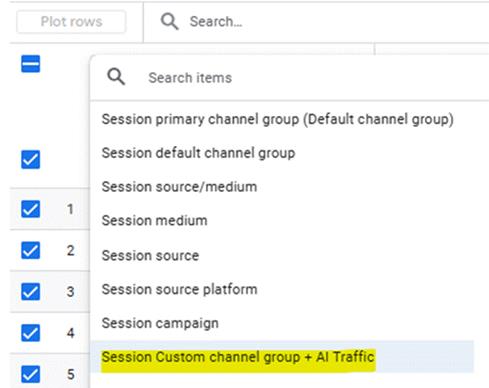
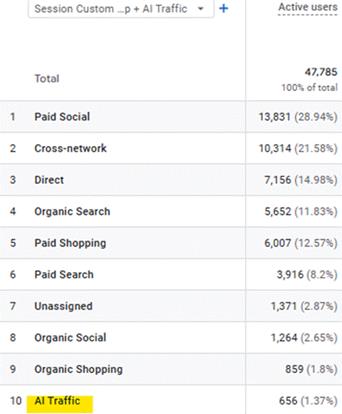
Step 4: Review your AI traffic
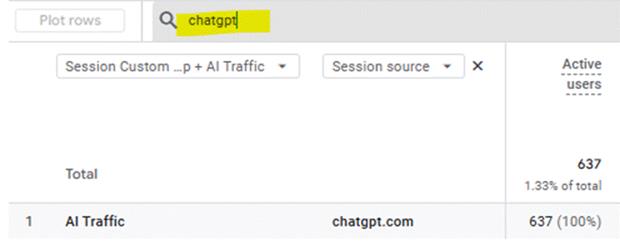
Extra Tip: To view traffic from a specific AI platform, add Session source as a secondary dimension. You can then use the search box to filter for the platform you want to review, such as chatgpt.com, perplexity.ai or copilot.microsoft.com.
You can then review:
- Sessions and users from AI platforms
- The landing pages receiving traffic
- Engagement rates
- Leads, sales and key events
Is all AI traffic visible in GA4?
No. AI referral traffic is not always reported accurately.
Some platforms open links through in-app browsers, redirects or privacy settings that do not pass the original referral source. As a result, some AI-driven visits may appear as direct traffic or under another channel in GA4.
AI referral traffic should therefore be used to understand the overall trend rather than treated as a complete figure.
At Core Optimisation, we provide clients with a Data Studio dashboard that brings AI traffic and key performance metrics into one clear report.
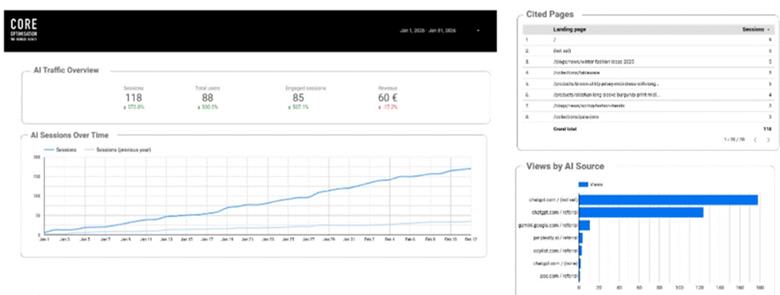
2. Brand mentions & Citations
Mentions and citations are both useful ways to measure AI visibility, but they tell you different things.
What is the difference between AI Mentions and Citations?
An AI mention happens when your brand is named in an AI-generated answer, whether or not there is a link to your website.
For example, if someone asks for the best homeware retailers in Ireland and your brand appears in the response, that counts as a mention.
An AI citation happens when an AI platform uses and links to a page on your website as a source for its answer.
You should track both because your brand may be mentioned without receiving a link. Your website may also be cited as a source without your brand being presented prominently in the answer.
Where can you track mentions and citations?
Bing Webmaster Tools
The AI Performance report shows when pages from your website are cited in Microsoft’s AI-generated answers. It also provides cited pages and grounding query phrases.
Grounding queries are phrases the AI system uses to retrieve information that supports its response. They may not be the exact prompt entered by the user, but they can help you understand the topics connected with your citations.
Semrush
Semrush’s AI visibility tools can track brand mentions, citations, prompts and competitor performance across major AI platforms. It can also show where your brand is appearing and how your visibility changes over time.
Ahrefs
Ahrefs Brand Radar can track mentions and citations across platforms including ChatGPT, Gemini, Perplexity, Microsoft Copilot and Google AI features. It can also be used to monitor custom prompts and compare your visibility with competitors.
No single platform shows the full picture. Using Bing Webmaster Tools alongside a tool like Semrush or Ahrefs gives you a clearer view of where and how your brand is appearing across AI search.
3. Cited Pages
Cited pages are the pages from your website that AI tools use to support their answers.
What often surprises businesses is that these are not always the pages bringing in the most organic traffic or ranking for their main keywords.
Where can you see your cited pages?
Bing Webmaster Tools
The AI Performance report shows which pages from your website are cited across Microsoft’s AI experiences, including Copilot and AI-generated summaries in Bing. It can also show the grounding queries connected with those citations.
Semrush
Semrush’s AI Visibility Toolkit includes a Cited Pages report showing which URLs from your website appear as sources in AI-generated answers. It can also show how frequently individual pages are cited across the prompts it monitors.
Ahrefs
Ahrefs Brand Radar can be used to identify URLs cited within AI responses and review the answers in which those pages appeared. This provides a wider view across the AI platforms tracked by Ahrefs.
What should you do with this information?
Once you have identified your cited pages, review each one carefully:
- Is the content accurate and up to date?
- Does it answer the question clearly and completely?
- Does it have a clear call to action?
These pages are doing quiet work for your brand in AI search. They deserve the same attention as your top-ranking pages.
4. AI Share of Voice
In traditional SEO, share of voice measures how often your brand appears compared to competitors. The same principle applies to AI search.
Tools like Semrush is building out AI share of voice tracking, showing which brands are cited most often for a given topic or category. Knowing where you stand relative to competitors helps you prioritise where to focus.
Share of voice can help you understand:
- Which competitors dominate AI results
- Which topics your brand is associated with
- Where your visibility is weak
- Whether your performance is improving over time
- Which products or services need more support
What to look for
Track AI share of voice by content pillar, not just brand name. You may be winning in one category and invisible in another.
5. Prompt Research
Keyword research is still important, but AI search has also introduced prompt research. Prompts are often longer and more conversational than traditional Google searches.
A user may search Google for: garden furniture Ireland
But ask an AI tool: What is the best weather-resistant garden furniture for a small garden in Ireland?
The second query gives much more information about the customer’s needs.
Tracking prompts can show:
- Which questions trigger your brand
- Where competitors appear instead
- Which products or services AI tools recommend
- What concerns customers have
- Which topics are missing from your content
- Whether the information shown about your business is accurate
Your prompt list should reflect the full customer journey, including awareness, comparison, recommendation and purchase questions.
The aim is not to track hundreds of random prompts. Focus on the questions that are most relevant to your customers and business goals. Use tools like Semrush to discover what prompts are triggering people to your site.
Start measuring AI visibility now
You do not need to wait for perfect data to begin measuring AI search.
Businesses that start now can identify which content is already being used, where competitors are gaining visibility and which customer questions need better answers.
Need help getting started? Core Optimisation can help you track and improve your visibility across AI search. Get in touch with our team today.